Lazy-loading containers in 2,200 lines of Go
2026-10-26
A Docker image for a simple numpy app is 1.17 GB, spread across 28,542 files. But the app only reads 210 of them, 81 MB in total. I measured 57 Python apps, and the median one reads 7.8% of its image.
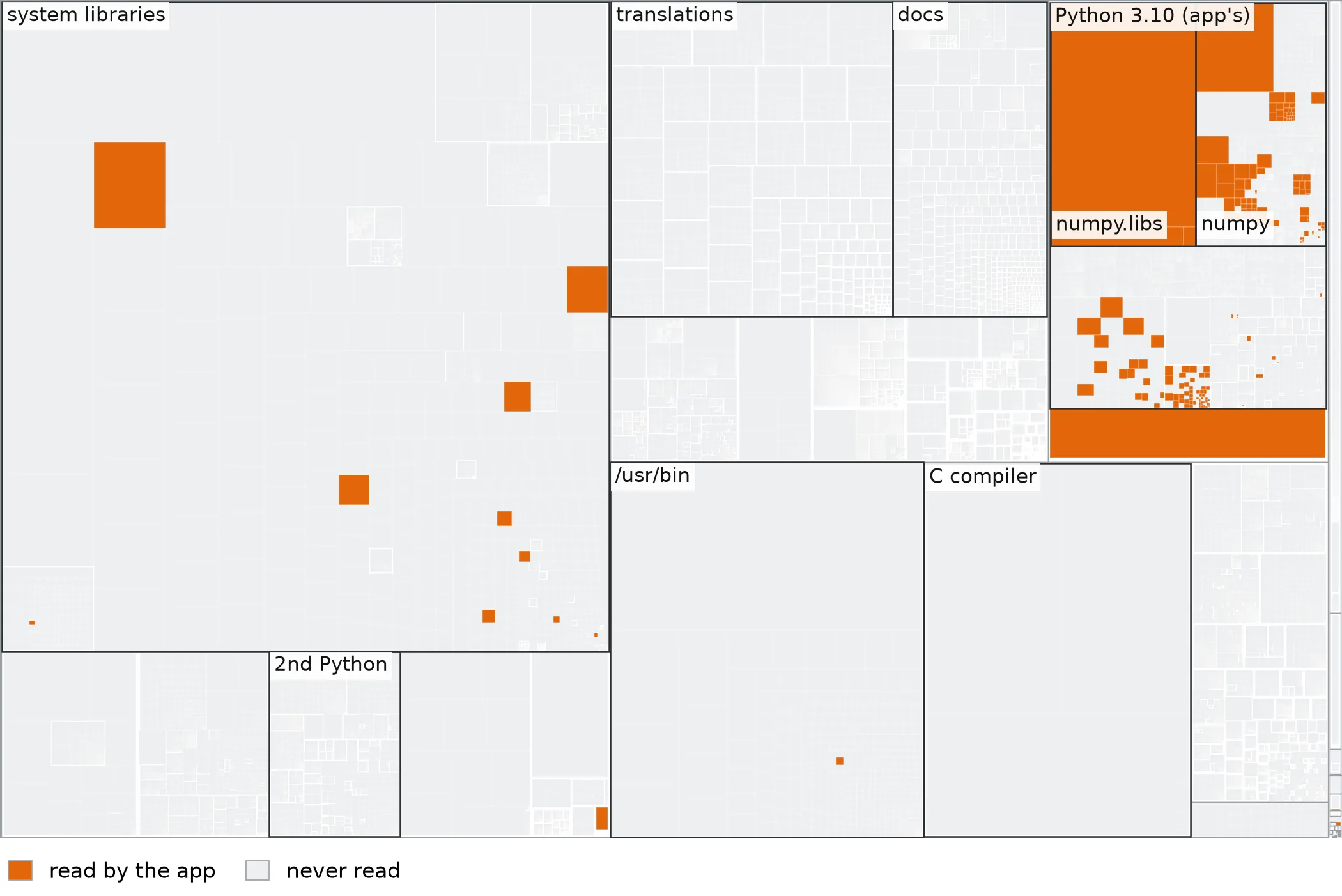
So most of a docker pull is spent downloading files the app never reads. I built tinycontainer, a container runtime that downloads each file only when the application opens it. The containers run inside a custom FUSE filesystem, which pulls files from a content-addressed fileserver and caches them on the worker. Caching locally on the worker is effective due to a large overlap in Python application dependencies even among unrelated tenants.
On a cold cache, it starts the median app 3.2x faster than docker pull + run on EC2. Once a worker is busy, a brand-new app finds 84% of its reads already cached, and starts in a median 2.4 s, against about 19 s for docker pull + run. The rest of this post covers the fast-boot tech behind this!
This approach is also used by sandbox providers. I pieced this together mainly based on the talk Creating our Own Kubernetes & Docker to Run Our Data Infrastructure | Modal by Erik Bernhardsson and the paper On-demand Container Loading in AWS Lambda. I don’t work at a sandbox company, so anything I say about production systems comes from those two sources.
Results
Across 57 Python apps, starting a container by streaming only the files it touches made the median app start 3.2x faster than docker pull + run. The trick is that a typical app reads only 7.8% of its image, so it’s much faster than having to pull the entire image.
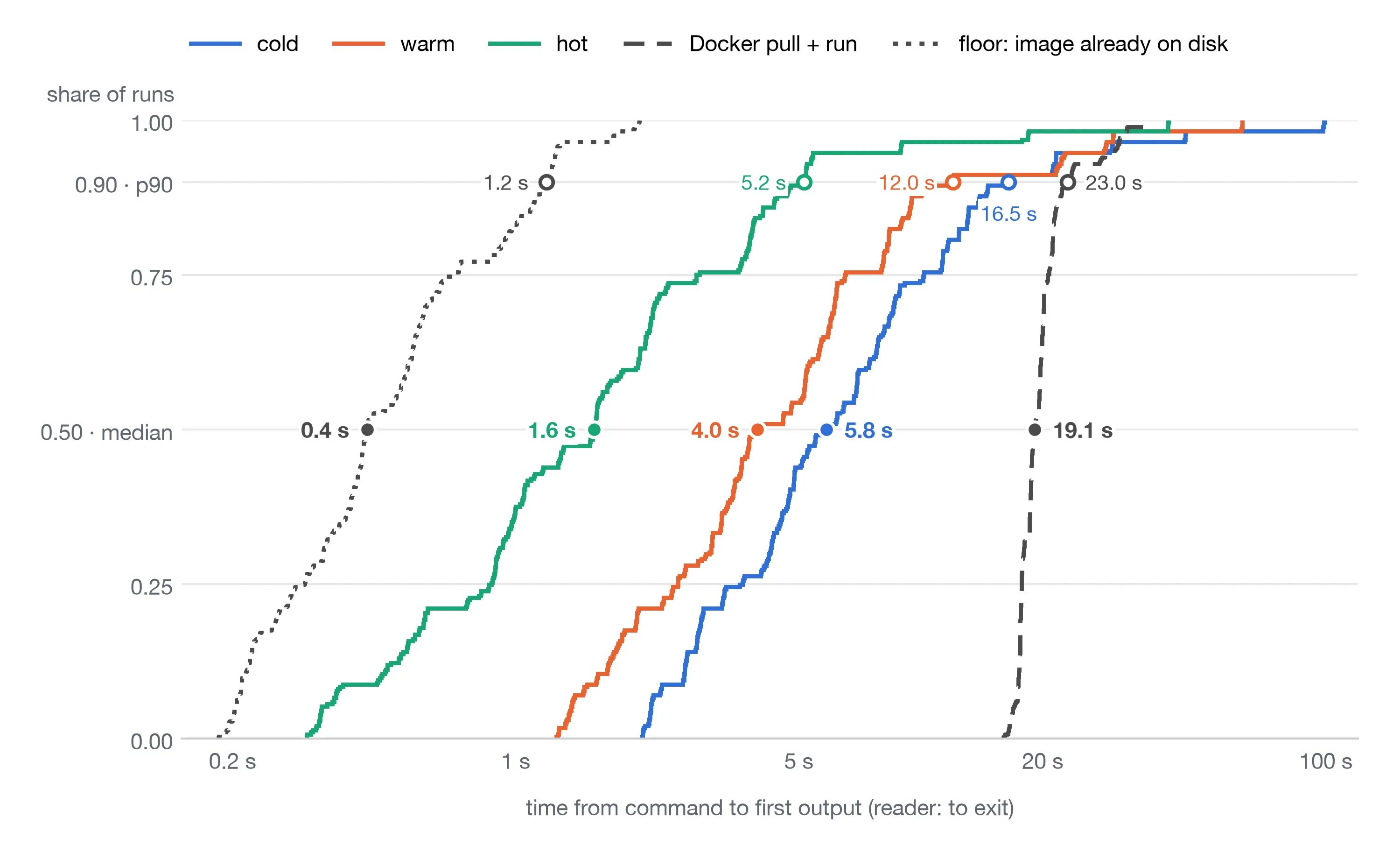
sway run (or docker pull) starts until the app’s first byte of output arrives, which every app prints right after its imports (reader is timed until it exits). The median and p90 for each series are annotated.I compare against docker pull + run because that’s what a fresh Kubernetes node does. Many sandbox providers use lazy-pulling snapshotters like AWS SOCI, which are built on the same ideas as tinycontainer.
The lines, from fastest to slowest median:
- Floor (grey, dotted): 0.4 s. This is the
docker runwith the image already on disk. This effectively means all files are pre-fetched, so we can’t expect to be faster than this. - Hot (green): 1.6 s. This is the second run of an application, so all files have been cached by the first run.
- Warm (orange): 4.0 s. The worker is restarted but keeps its disk cache. This should land close to hot, but it lands close to cold. The index from path to content hash lives only in memory, so after a restart the files are on disk but the worker can’t find them. This should be fixed if productionized.
- Cold (blue): 5.8 s. All caches are empty, so every file comes over the network from the fileserver. This is still faster than docker pull + run.
- docker pull + run (grey, striped). About half of this is the pull itself.
Hot is 1.2 s slower than the floor, even though more than 99% of its reads are served locally. My guess is the ~13,000 lookups going to userspace. Setting FUSE entry/attr timeouts to reduce the number of lookups is the first thing I’d try.
The high tail latency is due to a few applications in the benchmark intentionally reading every file in the image. This was chosen as the worst case scenario.
Why docker pull is slow
Docker pull downloads and unpacks the entire image for the application. This is time-consuming, since an image can be multiple GiBs in size. Surprisingly, very few of the files in the image are actually read by an application.
A simple docker image is around 1.17 GB in size, spread across 28,542 files. The translations and docs come to 145 MB, 12% of the 1.17 GB image, all of which the application does not need. The accompanying numpy app only reads 210 of those 28,542 files, which comes out to 81.5 MB. This is only 6.9% of the image.
This is common among applications. Across all 57 apps, the median bytes read is only 7.8% of the image. The range runs from 1.7% for hello (18 MB of 1.1 GB) to 37% for TensorFlow (849 MB of 2.3 GB). So waiting for docker pull is waiting to download files the application never reads. This replicates Slacker (Harter et al., FAST ‘16), which found containers read 6.4% of the data they pull.
We can therefore expect a faster boot time if we only download the files which the application actually needs, instead of every file in the image. Such a technique is also called lazy loading. We only fetch the files which the application asks for, when it asks for it.
The architecture of fast boots
We want a container runtime that only fetches the files a Python application actually reads, and nothing else. This is accomplished by two components. The worker runs the application inside a filesystem we built ourselves, so it can see every file the application asks for. The fileserver holds every file of every image, so any worker can run any application without downloading its image first.
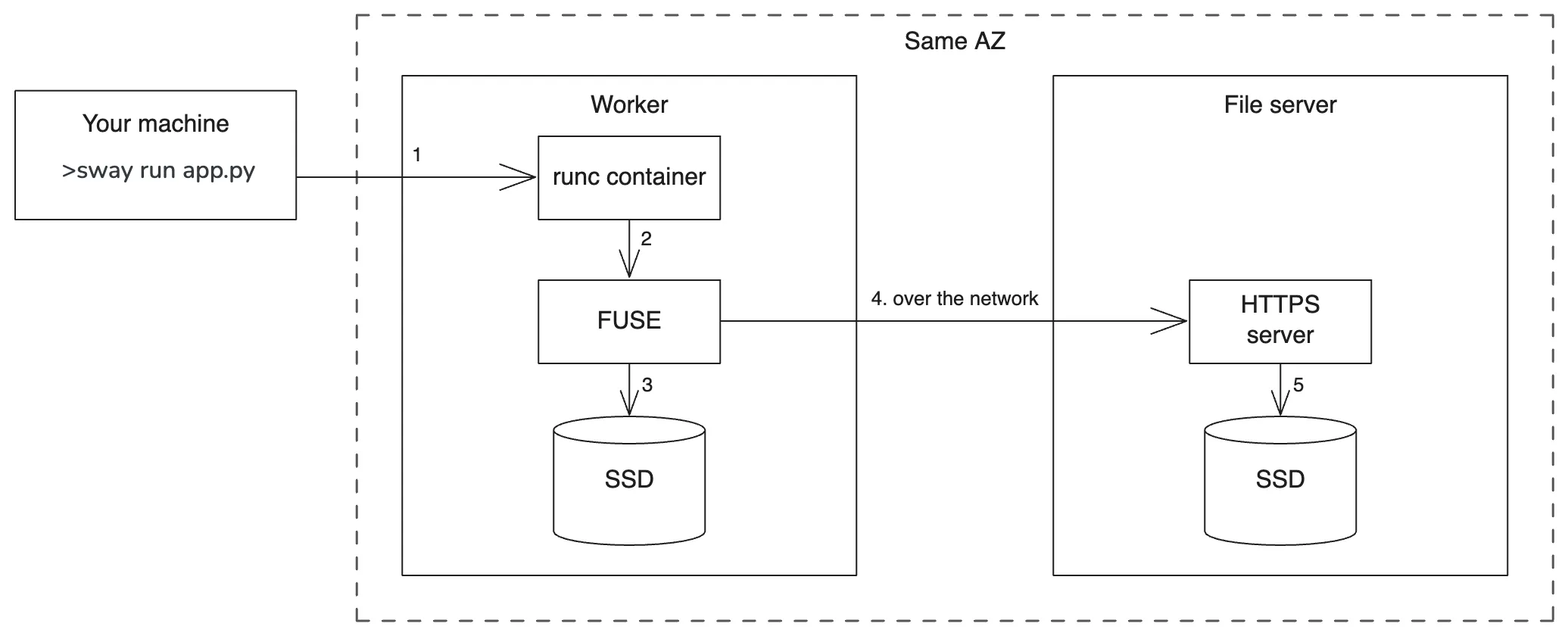
There are two main components:
- Worker: The worker’s responsibility is to run the users’ programs. All applications are executed in a runc container. The runc containers run in a FUSE filesystem. The custom filesystem lazily fetches the files needed either from a cache on disk, or over the network from the fileserver.
- Fileserver: The fileserver’s only job is to serve files which the FUSE filesystem needs. The fileserver contains all the files which the workloads need, for example the Python interpreter. These files are stored content-addressed on disk. I implemented this as a very simple cache which serves files on disk, but this is a natural use-case for blob storage.
A useful property of this architecture is that it’s horizontally scalable. If the number of tenants grows to be too large for a single worker to handle, more workers can be added. Due to the large amount of ever-changing images, it’s easier to store them all on one/few fileservers, instead of distributing them to every worker. The workers can then fetch only what they need.
The user brings a Python program, and a docker file describing its dependencies. I built a cli, named sway which helps the user run files and upload their dependencies. There are two commands
sway run <file-name>.pyasks the worker to run a file with runc and return the results.sway export- builds the Dockerfile, unpacks the image and uploads every file the fileserver doesn’t already have.

sway. The application ran in the cloud and finished in 3 seconds.Serving a filesystem over the network
The worker is the component which runs all the user’s Python applications. It starts with none of the program’s files, so it needs to read them from somewhere. A normal filesystem can only read from the machine’s own disk, so we need a filesystem which fetches over the network the moment the program asks for a file.
FUSE (Filesystem in Userspace) allows us to implement our own filesystem, and run it in userspace. When the Python application touches a file, the kernel forwards the request to our custom filesystem, so our own code can decide if the file should be fetched over the network. The worker mounts its FUSE filesystem and runs each container inside it.
The most important function to implement is Lookup. The kernel calls Lookup on any name in a directory it hasn’t seen yet. A normal filesystem implementation of Lookup would search on disk and return “not found” since the worker starts with no files on disk. So our implementation asks the fileserver instead.
The Python application is translated into syscalls by the C library. For example, when Python runs import numpy, the interpreter calls stat/open on candidate paths like site-packages/numpy/__init__.py. The kernel resolves the path one component at a time. First site-packages, then numpy, then __init__.py. Each component it hasn’t seen yet becomes a Lookup(name) on its parent directory. Our FUSE implementation of Lookup then makes a request to the fileserver for that file:

import numpy statement is translated into a syscall. The kernel then calls our FUSE Lookup, which is implemented to query the fileserver and return the file.It’s the Python application which determines which files get fetched from the fileserver. The filesystem only fetches the files which the program explicitly asks for. The fileserver is assumed to have every file the program needs. I will explain how that happens later in this article.
The drawback to this is that going over the network for every lookup is slow. Despite the worker and fileserver being in the same Availability Zone, each request takes about 0.2 ms and up to 2.2 ms on a new connection. A typical cold start makes about 13,000 lookups, and about 1,200 of them go over the network, so caching is a good investment.
Three-level cache
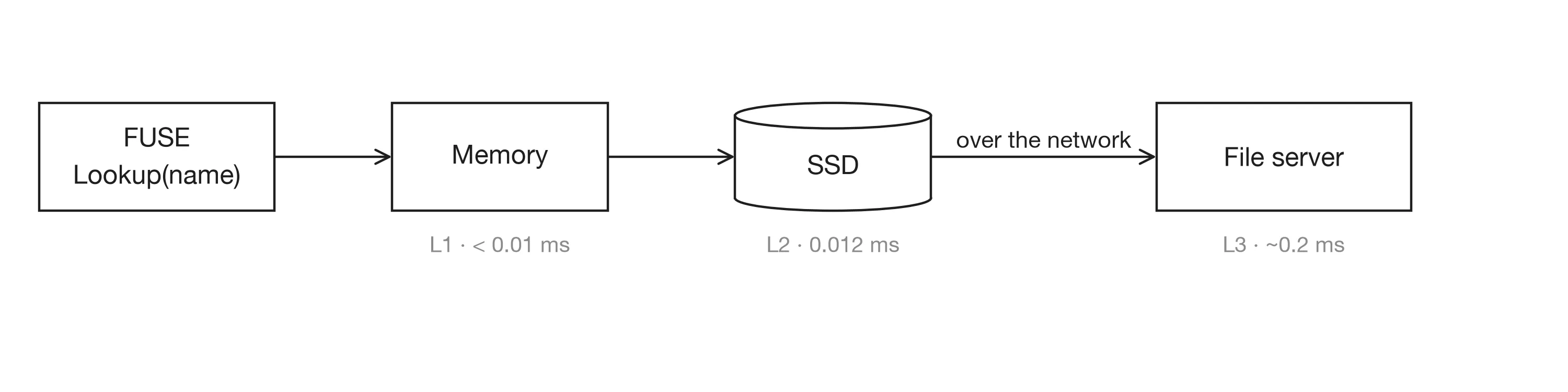
Going over the network takes 0.2 ms (2.2 ms on a new connection), as per my own measurements. This is an order of magnitude slower compared to reading the file directly from an SSD. The worker caching the files read by the Python application will therefore significantly speed up the execution
| Level | Median lookup |
|---|---|
| L1 · worker memory | under 0.01 ms |
| L2 · worker disk | 0.012 ms |
| L3 · fileserver | ~0.2 ms (2.2 ms on a new connection) |
After fetching a file from the network, we should therefore cache the file locally on the worker disk. Lookup should then first check if the file exists on disk, and only go to the network when needed.
 The Lookup implementation illustrates the three-level cache well (ref):
func (d *Directory) Lookup(
	ctx context.Context, name string, out *fuse.EntryOut,
) (*fusefs.Inode, syscall.Errno) {
	key := filepath.Join(d.path, name)
	// Check if directory/file is known to be not found
	if d.rootFS.isNotFound(key) {
		return nil, syscall.ENOENT
	}
	// Skip Python temp files - they'll never exist on server
	if strings.Contains(name, ".pyc.") || strings.Contains(name, ".pyo.") ||

		(name == "__pycache__" && !pycEnabled) {
		return nil, syscall.ENOENT
	}
	// We can't cache the user's runscript, as it might change! Needs to be fetched fresh.
	if isScript(name) {
		return d.scriptFromFileserver(ctx, name, out)
	}

	// Directory is in memory
	d.mu.RLock()
	if childDir, found := d.children[name]; found {
		d.mu.RUnlock()
		LookupStats.MemoryCacheHits.Add(1)
		return &childDir.Inode, 0
	}
	d.mu.RUnlock()

	// Directory/File is on the disk
	if inode, ok := d.fromDiskCache(ctx, name, key, out); ok {
		return inode, 0
	}

	// Last check: File/Directory has to be on the fileserver.
	return d.fromFileServer(ctx, name, key, out)
}
Going through the tinycontainer implementation of Lookup:
- All files and directories are identified by their full path:
key := filepath.Join(d.path, name) - Then it skips names that can’t exist on the fileserver like python temp files and directories we already know are missing.
- The user’s own script (
isScript) is always fetched from the fileserver because it changes between runs. - Next is the three-level cache:
- L1: The in-memory inode tree. Directories the worker has seen are in
d.children, and files it has opened keep their bytes in memory. - L2: A content-addressed store on the worker’s disk (
filecache/<sha1>), plus an in-memory indexkeyDirthat maps path → hash.Lookupchecks the index and reads the file from disk. - L3: Look up in the fileserver over the network. It is assumed that the fileserver holds all files a program needs. If this is not the case, the program can not run.
- L1: The in-memory inode tree. Directories the worker has seen are in
Notice the pattern: If the file is not in memory (L1), look in disk (L2). If the file is not on disk (L2), look in the fileserver (L3) with a network call. If a file is found in L3, the file is written to the L2 cache for future fetches.
The power of multi-tenancy
The worker runs many tenants’ containers side by side. Users can run arbitrary code, yet there is a large overlap between their Docker images. Most Python apps share the same Debian base, the same Python interpreter and libraries. This makes the worker’s in-memory and disk cache very effective. Once a worker has run a few workloads, it will fetch files over the network less and less.
The worker machine is shared among many user’s applications: Whenever an application fetches a file over network, it lands in the worker’s L1 and L2 caches, and speeds up every other tenant that needs the same file. The first user to import numpy makes numpy fast for everyone after them. This is an attractive property, due to the large overlap between python programs (see Why docker pull is slow).
To measure this, I ran a mixed workload of 200 runs on one worker, spread across 37 of the 57 apps. The remaining 20 apps pin conflicting versions of the same packages. The fileserver only keeps one index from path to content hash for all images, so their files would overwrite each other at the same paths. For example exporting numpy 2.x breaks all existing numpy 1.26 since the fileserver only stores one /usr/local/.../numpy/__init__.py. This is a bug which should be fixed.
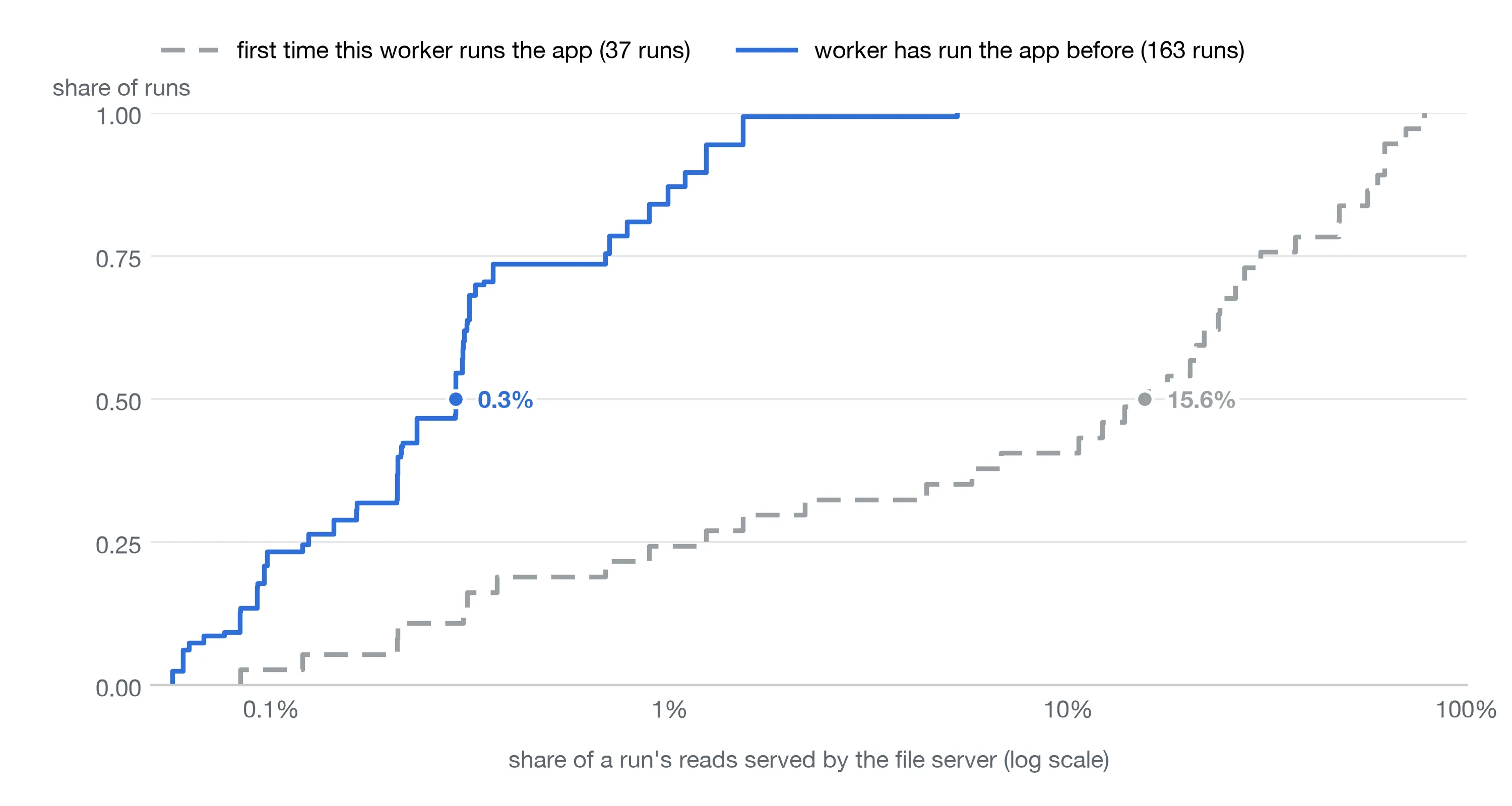
Once the worker is busy, the median run goes to the fileserver for only 0.3% of its reads. More interesting is what happens to a brand-new app. Its first run on a busy worker already finds 84% of its reads cached. Even a brand-new app gets a warm start, as long as the worker has run similar apps before.
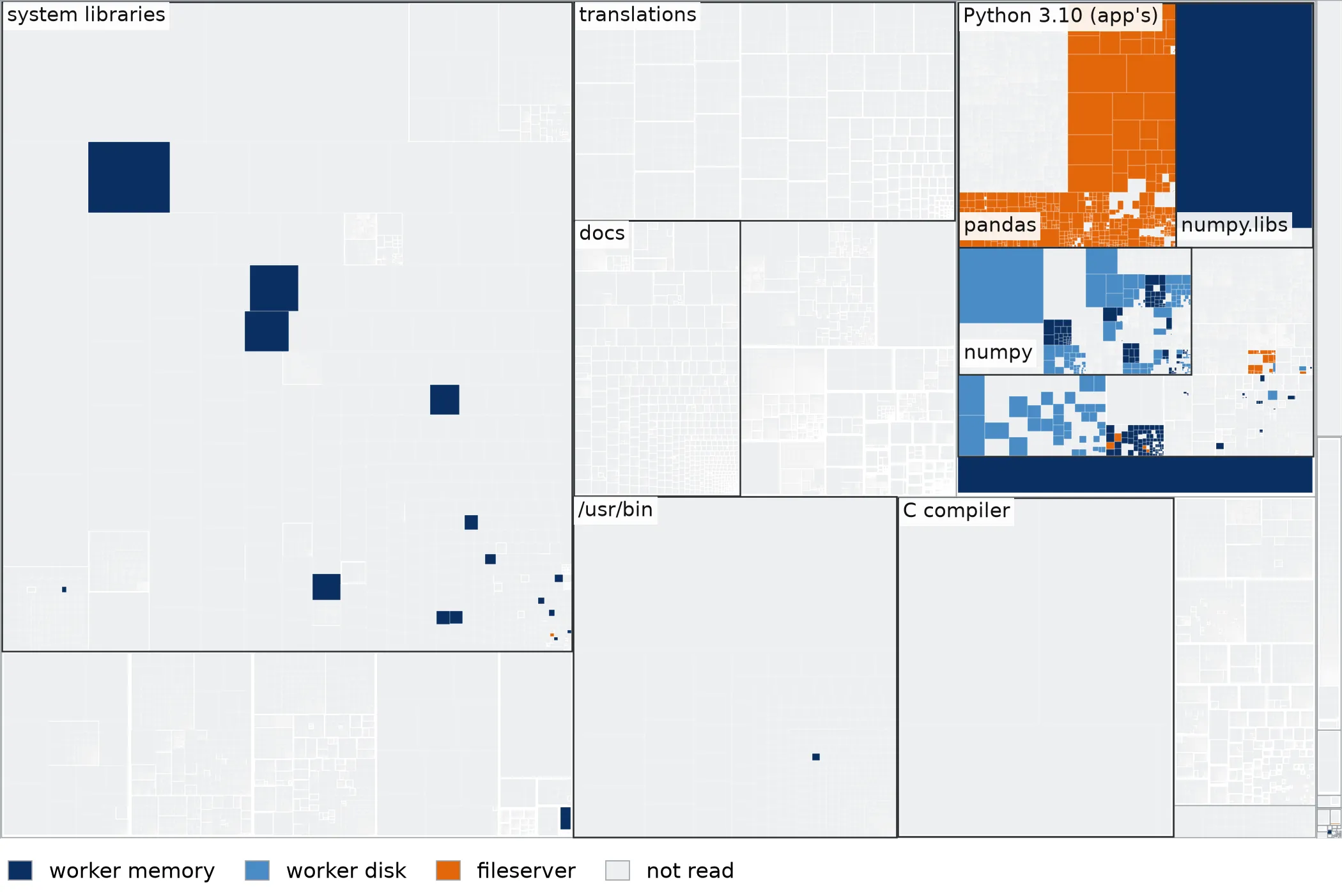
During normal operations, the fileserver therefore receives few requests. However, the danger to this is that if the worker cache is suddenly emptied, eg. during a deploy or OOM, they would all hit the fileserver at once. This can be dangerous if the fileserver is not prepared to handle such a surge in traffic. A system that is fast due to its cache inherently has this risk. Persisting the index, warming workers before they take traffic and rate-limiting cold fetches would all make the bad mode survivable.
We have now built a filesystem which only finds the files it needs, and finds them fast. Next step is to actually run the Python application inside this filesystem.
Running applications
The lazy-loading filesystem is only useful once the Python application runs inside it.
To run a Python application, users run sway run <filename>.py. Under the hood, this uploads their script to the fileserver, and asks the worker via a /run HTTP endpoint to run a Python program named <filename>.py. The worker is just told to run a Python program, and eventually the FUSE filesystem fetches it from the fileserver when needed.
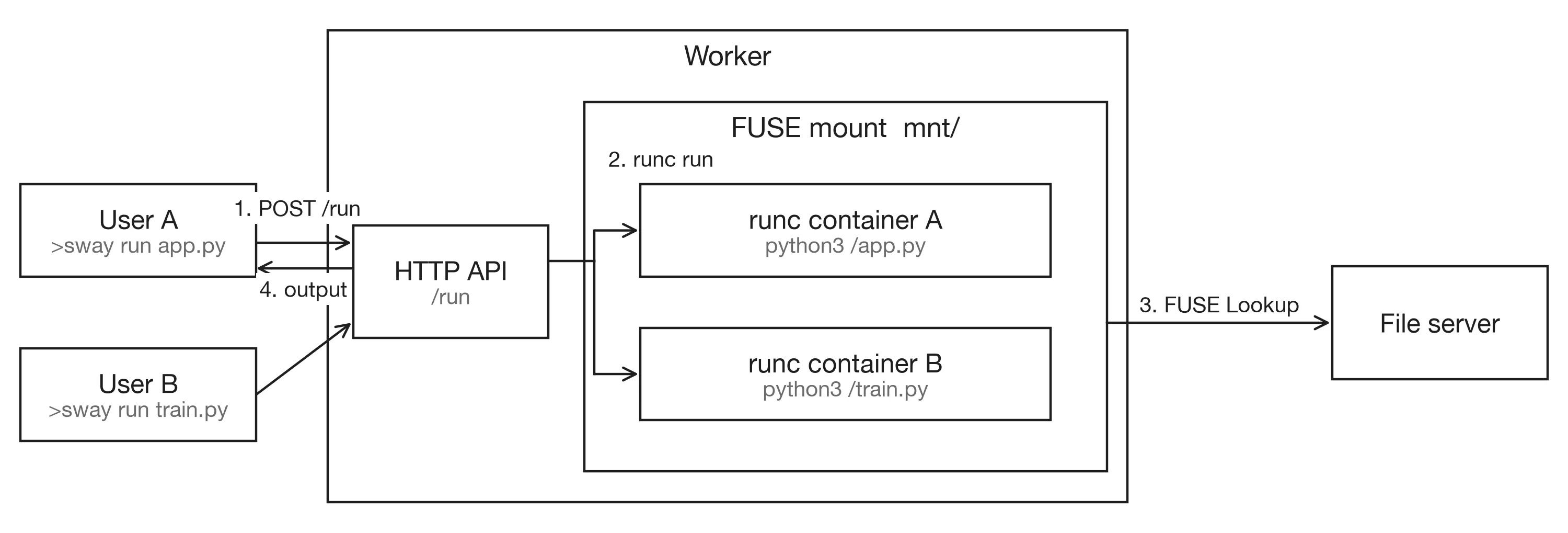
/run endpoint launches the container inside the FUSE filesystem and reports the result back. A second user runs concurrently.The worker starts containers with runc, the tool Docker itself uses to start containers. For each run, the worker writes a config.json into a temporary directory and starts the container:
sudo runc run --bundle /tmp/runc-bundle-123 <container-id>The config says what to run. For us, it’s just the python application python3 app.py. Config also specifies where its root filesystem is, and what extra mounts it gets:
"process": { "args": ["/usr/bin/env", "python3", "/app.py"] },
"root":    { "path": "/path/to/mnt/app" },
"mounts":  [{ "destination": "/tmp", "type": "tmpfs", "options": ["size=512m", ...] }, ...]
The important line is root.path. When the worker boots up, it mounts its FUSE filesystem at mnt/, and every container’s root directory is mnt/app. So when Python opens /usr/local/lib/python3.10/... inside the container, it is really opening a path in our FUSE filesystem, which means files are fetched on demand.
Our FUSE filesystem is read-only. Many applications need scratch-space to function, eg. applications plotting charts using matplotlib. Programs therefore get scratch space from small in-memory filesystems tmpfs that runc mounts at /tmp, /root and /var/tmp. The config also caps each container at 1 CPU and 8 GiB of memory. The full config is here.
A limitation to containers is the lack of strong isolation. runc containers share the host kernel, and since every container sees the same root filesystem, any tenant can read the files of every image on the fileserver. Production sandboxes run each tenant in gVisor or a microVM.
All of this assumes the fileserver already has every file the FUSE filesystem asks for. The next section shows how they get on the fileserver.
Ensuring the files exist on the server
The core assumption of fetching files over the network is that you have an endpoint which can return the file and its contents. But how do we ensure that the fileserver has all the dependencies of our user’s Python programs? They are after all allowed to run arbitrary programs and import arbitrary dependencies.
The answer to this is the sway export command. In addition to some Python code, each user also supplies a Dockerfile. sway export reads the Dockerfile, and converts it into all the files needed to run the application, and sends them to the fileserver. This command should therefore be called whenever a new dependency is added to the user’s application.
It’s a straightforward recipe:
-
Build the image In the project directory it runs
docker build sway-<dirname> --load. This builds the image from the user’s Dockerfile and loads it into the local Docker. -
Save it as a tarball Next step is
docker image save sway-<dirname>writesimage.tar. This tarball contains everything the Python application needs to run, from Debian base files to the Python interpreter.:
image.tar
├── manifest.json        ← which layers, in what order
├── <config>.json        ← env vars, entrypoint, etc.
└── blobs/… (or <id>/layer.tar)
    ├── layer 1.tar      ← e.g. the Debian base: /usr, /etc, /bin, …
    ├── layer 2.tar      ← e.g. Python installed into /usr/local
    └── layer 3.tar      ← e.g. pip install numpy → /usr/local/lib/python3.10/site-packages/numpy
manifest.json contains the layers, and which order they are applied in.
- Flatten the layers
A docker image is composed of layers. Each layer is a diff of added/changed files, on top of the previous. The first layer contains the Debian base like
usrdirectory, and the next layer adds the Python interpreter/usr/local/python3.10. Then the next layer is dependencies likeusr/local/lib/python3.10/site-packages/numpy, and so it continues layer-by-layer until all files needed are added. This means that applying all the layers leaves you with the image’s final filesystem. This is what the container needs to run the entire application!
sway export reads the layer order from manifest.json and then applies all layers into a temporary directory. The result is the image’s final filesystem, everything a container needs.
-
Hash every file We then walk the temporary directory to get a big list of all the files needed. Each file gets a SHA-1 of its contents before being sent to the fileserver. The fileserver and worker stores files by this hash. This ensures that the same file appearing in many images is only stored once.
-
Upload only what’s missing The client sends the list of paths and hashes to the fileserver, which replies with the ones it doesn’t have yet. Only those not seen are uploaded. Then the temporary directory is deleted. The fileserver now contains all files needed to run the container!
Into an empty fileserver, exporting the numpy app’s image uploads all 35,602 entries (28,542 files plus directories and symlinks) and takes about 85–90 s. When the fileserver already holds most of the files, as it usually does, an export uploads almost nothing, but still takes about 40 seconds. This is the time it takes to build, save, unpack and hash about 30,000 files.
Admittedly, this is the most janky part of the system. It’s a very literal, Rube Goldberg machine way of doing it.
The obvious fix is to start tracking which layers the fileserver has already seen. Docker already content-addresses every layer by its digest, and most images share the bottom ones like the Debian base. If the fileserver remembered which files each layer digest holds, sway export could skip those layers and only unpack the top one, which is usually just the pip install. I haven’t built this, but I’d expect most of those 40 s exports to drop to a few seconds.
Results in depth
How I measured it
Everything ran on two EC2 instances in the same availability zone, 0.14 ms apart. The worker was an m6i.2xlarge; the fileserver and a Docker registry ran on an m6i.xlarge. Each Python application’s container got 1 CPU and 8 GiB of memory. Applications were run sequentially, not concurrently.
I used 57 Python apps, each a short realistic task: a stdlib script, numpy, pandas, scikit-learn, PyTorch, TensorFlow, Django and FastAPI handlers, image processing and more. One app, reader, reads every file in its image on purpose. It is the worst case for lazy loading.
Each start is timed as time to first output: from the moment the client runs sway run (or docker pull, for the Docker baseline) until the first byte of the app’s stdout reaches it. That measure is only meaningful if the app prints after it has done its imports, so every app prints a ready line straight after its imports and flushes it. The exception is reader, which prints before it starts reading, so it is timed until it exits. Every app was run 5 times in each condition, and I report the median.
Results
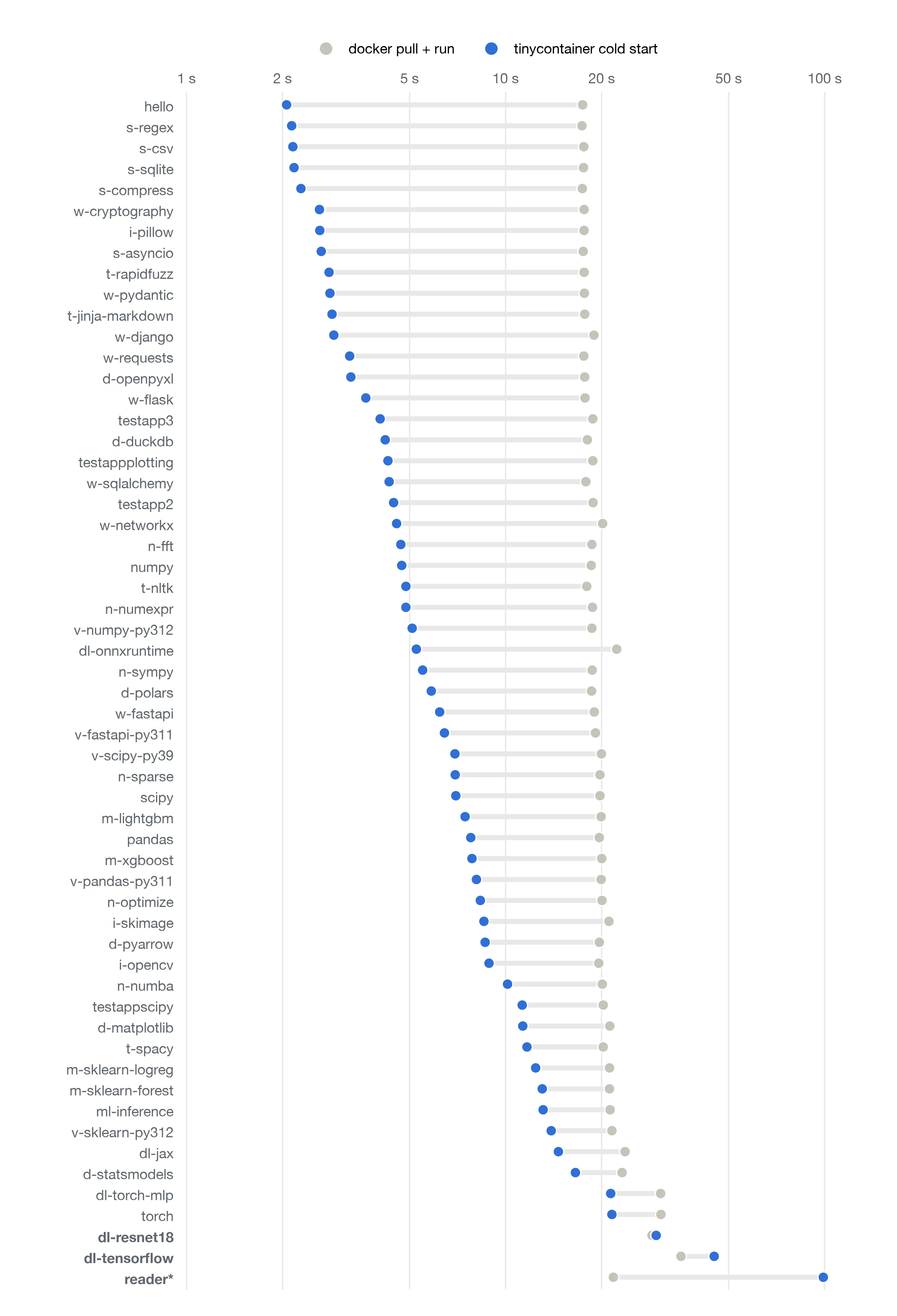
reader is timed until it exits.Even a cold tinycontainer worker is faster than docker pull + run on the majority of apps. But it’s slower when a program reads most of its image: reader, which reads every file, took 98.8 s against 21.7 s for docker pull + run (4.6× slower).
Conclusion
We have now built:
- a fileserver that stores every file once, by its content hash,
- a worker that runs each program in a runc container on top of its own FUSE filesystem,
- a three-level cache on the worker: memory, local disk, then the fileserver.
- and
sway, a CLI that runs programs on the worker and uploads an image’s missing files.
in just 2,200 lines of Go.
Together, these make a container runtime that starts Python programs a median 3.2× faster than docker pull + run. Once a worker is busy, a brand-new app finds 84% of its reads already cached, and starts in a median 2.4 s, against about 19 s for docker pull + run. Two ideas that do most of the work are lazy loading and sharing the cache across tenants.
Productionising this
As far as I can tell from the Lambda paper and Modal’s talk, the production systems are built from the same parts as tinycontainer. They just do each part much better due to years of engineering.
Lambda splits each image into fixed-size chunks and only fetches the chunks a read actually touches. tinycontainer fetches the whole file in Lookup, so even a stat on a 400 MiB library downloads all of it. Lambda also has a shared cache between its workers and S3, so a cold worker can usually get a chunk from there.
I also skipped isolation entirely. tinycontainer runs plain runc containers on the host kernel. Sandbox providers put each tenant in a microVM or gVisor. Modal has a public fork of the Rust FUSE library that serves FUSE into a VM over virtio-fs, with multi-threaded request handling, per-tenant user ID mapping and memory trimming per mount.
What I would build next
- The fileserver keeps an index per image, so different versions of the same file don’t clash.
- Persisting the worker’s file-name to hash index on the disk.
- Caching directories to reduce the number of lookups.
- Move the fetching of files to
Openinstead ofLookup. - The fileserver keeps track of which image layers it has seen.
- microVM for better isolation.
- TTL on the caches.
Appendix: the full filesystem
In total to implement the filesystem, I implemented the functions:
| Operation | On | Called when… | What tinycontainer does |
|---|---|---|---|
OnAdd | root | the filesystem is mounted | Creates /app plus empty standard Linux directories (proc, dev, sys, lib64, …) that runc mounts over |
Lookup | directory | the kernel resolves a name it hasn’t cached (open, stat, exec, …) | Walks the three cache levels; on a miss, fetches the whole file from the fileserver |
Readdir | directory | a directory is listed (ls, os.listdir, Python’s import system scanning sys.path) | Merges the subdirectories it knows with a listing from the fileserver; registers the entries without fetching their contents |
Getattr | directory | stat on a directory | Returns a fixed mode (0755) |
Getattr | file | stat on a file | Returns size, mode and modification time from the file’s metadata |
Open | file | open() | Loads the file’s bytes into memory once, from the disk cache if needed |
Read | file | read() | Copies the requested range out of those in-memory bytes |
Statfs | root | df / statfs() | Reports a large fixed size: a remote store is effectively unbounded |
You do not have to implement all functions that the filesystem’s interface defines. Notice that all of these functions are read-only. There’s no Create, Write, Mkdir or Setattr, which makes the filesystem read-only. Scratch space comes from the tmpfs mounts runc adds (/tmp, /root, /var/tmp).
This is the state which the filesystem keeps:
// The whole filesystem: one per worker.
type FS struct {
    fusefs.Inode
    root        *Directory
    client      *http.Client        // talks to the fileserver (L3)
    notFoundSet map[string]struct{} // paths known not to exist; cleared at the start of each run
}

// One per directory the worker has seen.
type Directory struct {
    fusefs.Inode
    mu       sync.RWMutex
    path     string
    children map[string]*Directory     // L1: subdirectories already in memory
    keyDir   map[string]cachedMetadata // L2 index: path → content hash of files on local disk
    parent   *Directory
}

// What the worker remembers about a file on disk.
type cachedMetadata struct {
    hash  string // SHA-1 of the contents; the file lives at filecache/<hash>
    mode  int64
    size  int64
    mtime uint64
}

// One per file the program has looked up.
type file struct {
    fusefs.Inode
    Data     []byte    // the whole file, loaded once
    attr     fuse.Attr // size, mode, mtime
    path     string    // filecache/<hash> on local disk
    loadOnce sync.Once
}