Postgres query CPU is surprisingly predictable
2026-10-20
In March, PlanetScale launched Traffic Control:
Introducing Database Traffic Control: a Postgres traffic management system built into PlanetScale.
— PlanetScale (@PlanetScale) March 23, 2026
Enforce flexible budgets on your database traffic to protect against unexpected and dangerous workloads. pic.x.com/1eTRX1HZFK
Traffic Control lets you decide which queries get to run on your Postgres database. You can block low-priority queries outright, or cap their CPU usage at a share of the server. For example, queries tagged analytics may use at most 10% of the CPU.
To admit or reject a query based on CPU, you have to know how much CPU it will use before it runs. When I first read PlanetScale’s description of how Traffic Control does this, I thought: no way that works!
Turns out, it does work. After a few runs of a query, half of the predictions are within about 1% of the actual CPU. It works mostly because the same query fingerprint uses almost the same CPU every time.
I built the same kind of model into a Postgres extension and measured it on two standard benchmarks.
Not affiliated with PlanetScale
Traffic Control is a PlanetScale product. pg_admission is my own independent project and isn’t affiliated with or endorsed by PlanetScale. These benchmarks say nothing about how Traffic Control itself performs.
The model
The model is very simple, and also described in detail by PlanetScale in their article Behind the scenes: How Database Traffic Control works.
For each query fingerprint, it attempts to learn the relationship between Postgres’ planner cost and the actual CPU time taken to execute the query.
This means we need to calculate for each query.
Whenever a new query arrives, we first let the planner estimate its cost. If we know an accurate for this type of query, we can calculate and can reject the query if it’s too expensive.
is the relationship between the planner’s estimated cost and its actual cost in terms of CPU resources on the server. The unit is microseconds of CPU per planner cost unit.
We can estimate the relationship between planner and CPU cost based on previous queries. To know an accurate , we store the and for each fingerprint. Whenever a new query has executed, we update them using exponential smoothing:
where is the value just observed, and is the previous smoothed value. I use . Over time, this yields a value which estimates the CPU cost from past queries of the same type.
As an example, we can use the following query:
SELECT
    l_returnflag,
    l_linestatus,
    sum(l_quantity) AS sum_qty,
    sum(l_extendedprice) AS sum_base_price,
    sum(l_extendedprice * (1 - l_discount)) AS sum_disc_price,
    sum(l_extendedprice * (1 - l_discount) * (1 + l_tax)) AS sum_charge,
    avg(l_quantity) AS avg_qty,
    avg(l_extendedprice) AS avg_price,
    avg(l_discount) AS avg_disc,
    count(*) AS count_order
FROM
    lineitem
WHERE
    l_shipdate <= CAST('1998-09-02' AS date)
GROUP BY
    l_returnflag,
    l_linestatus
ORDER BY
    l_returnflag,
    l_linestatus
Veteran database benchmarkers will recognise this query as Q1 from TPC-H. It reads all 6 million rows of lineitem and filters out items shipped after 1998-09-02. The CPU is spent on computing the sums and averages, making this one of the heavier queries in TPC-H.
When this query arrives, the planner estimates its cost: 387,288 (in Postgres’s own cost units). From earlier runs of the same fingerprint we know µs per planner cost unit, so we predict of CPU. If the user’s budget can’t afford 5.9 seconds, the query is blocked before it runs on the server.
I ran TPC-H with my take on Traffic Control enabled.
Error is defined as
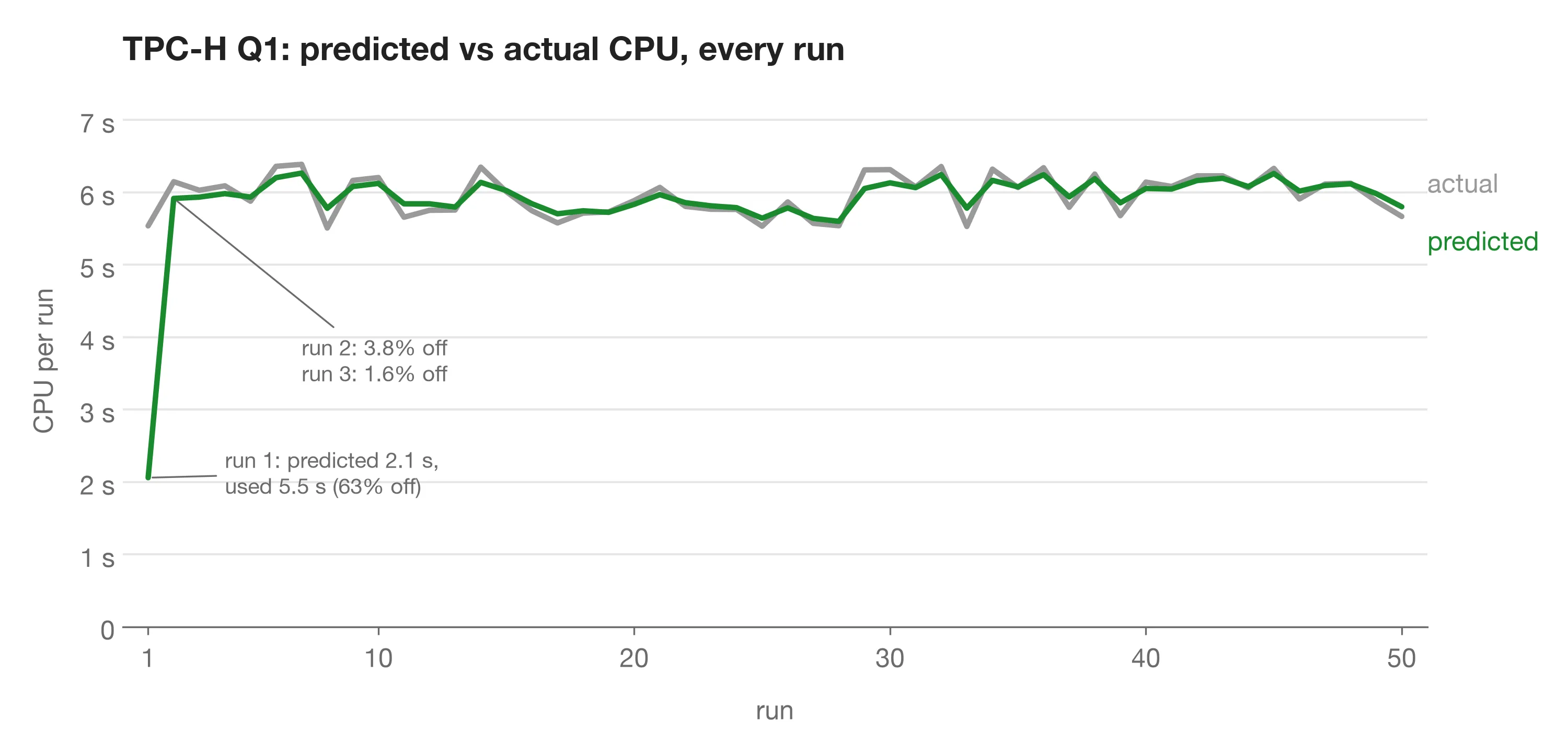
TPC-H Q1: 50 runs, 24% of all TPC-H CPU.
| Run | Predicted | Actual | Error |
|---|---|---|---|
| 1 | 2.06 s | 5.54 s | 62.8% |
| 2 | 5.92 s | 6.15 s | 3.8% |
| 3 | 5.93 s | 6.03 s | 1.6% |
| 10 | 6.12 s | 6.20 s | 1.3% |
| 20 | 5.84 s | 5.89 s | 0.9% |
| 50 | 5.80 s | 5.67 s | 2.4% |
| Runs 11–50 | 1.3% median |
The first run is very off. In this case I let the CPU cost be estimated from the median of all other queries, which is clearly not very accurate.
After the first run however, the error drops fast, and the median error for this fingerprint is 1.3%. With errors this stable, the user (or even the extension!) could give each budget a small safety margin based on the measured error.
This error is far lower than I expected. I would have expected a larger variance in the CPU time spent, even for the same query fingerprint. Let’s see if it’s as accurate for more queries.
Benchmarks
Workloads
TPC-H and the Join Order Benchmark (JOB) are two well-known database benchmarks:
- TPC-H: 22 analytical queries over a database for an online shop. The queries take between about 50 milliseconds and 6 seconds of CPU. Many of them contain dates, and I shifted those randomly on every run, so the same query does a different amount of work each time.
- JOB: 113 queries over real data from IMDB (movies, actors, companies), built specifically to trip up the query planner. The queries range from under a millisecond to 70 seconds of CPU.
Test environment
I ran everything on a single AWS c7i.2xlarge (8 vCPUs, 16 GB RAM, dedicated CPU) with Ubuntu 24.04 and Postgres 18.6. I set shared_buffers to 8 GB so the data could stay in memory and disk reads wouldn’t show up as CPU time. I turned off JIT and parallel workers. Everything else is left at the Postgres defaults. The client ran on the same machine, which is fine since I am measuring CPU time.
CPU time is the user plus system CPU of the Postgres process running the query, read with getrusage when execution starts and again when it ends. Planning time isn’t included.
I used in the model.
Results
Each chart below plots every query from its 2nd run to its 20th. A point shows the error percentiles across all queries at that run. The numbers on the right of the chart show the percentile over runs 11–20. From run 11 onwards, we assume the error is settled.
I left out run 1, where nothing has been learned yet; it’s off by 40–100% as we saw with Q1 above.
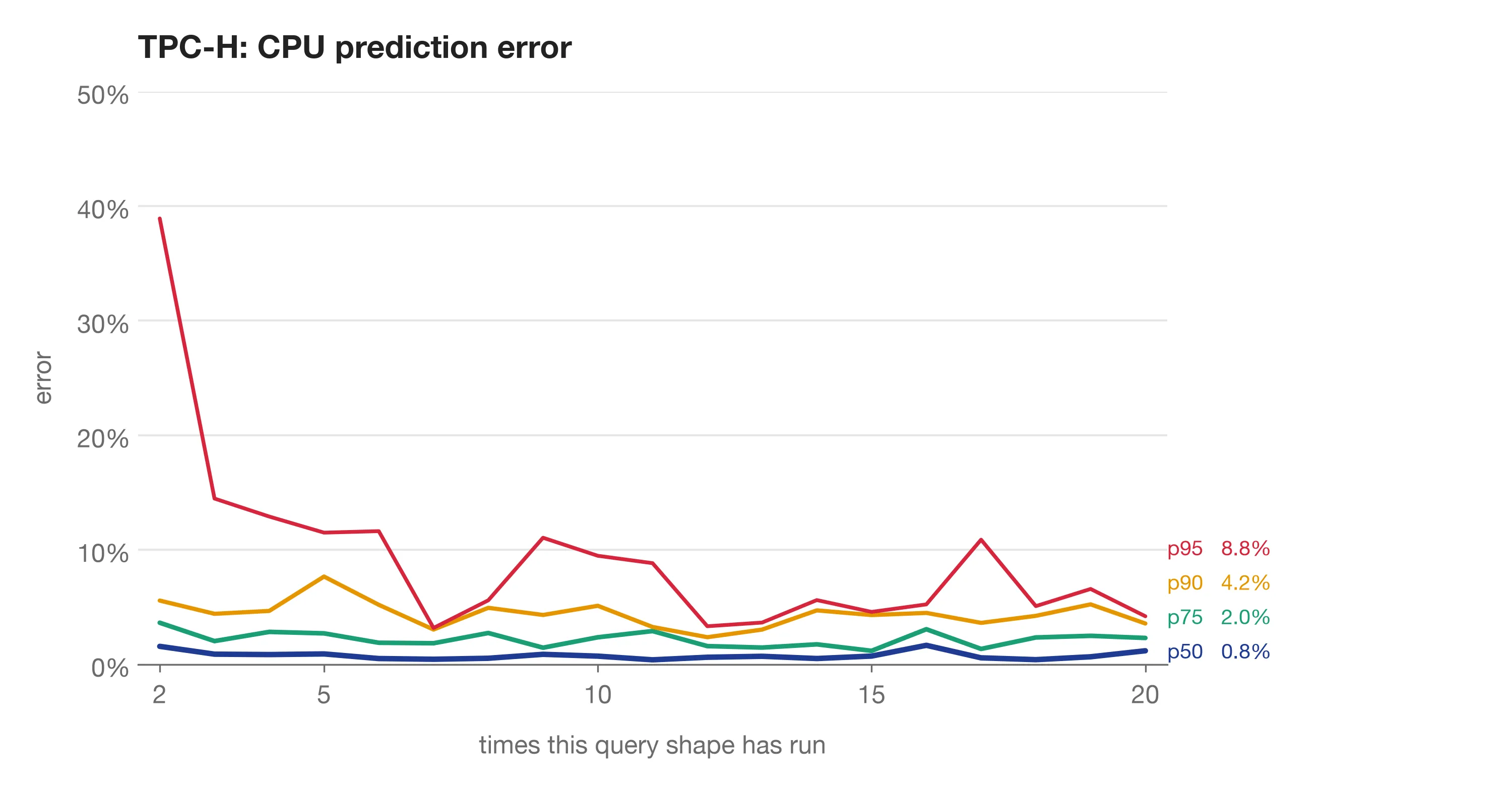
From the second run on, half of all predictions are within 1.6%, settling at 0.8% over runs 11–20. 90% of predictions are within 4.2% error. The p50 and p75 lines stay flat. The jumps in p90 and p95 are mostly a single query, Q3, which I’ll come back to.
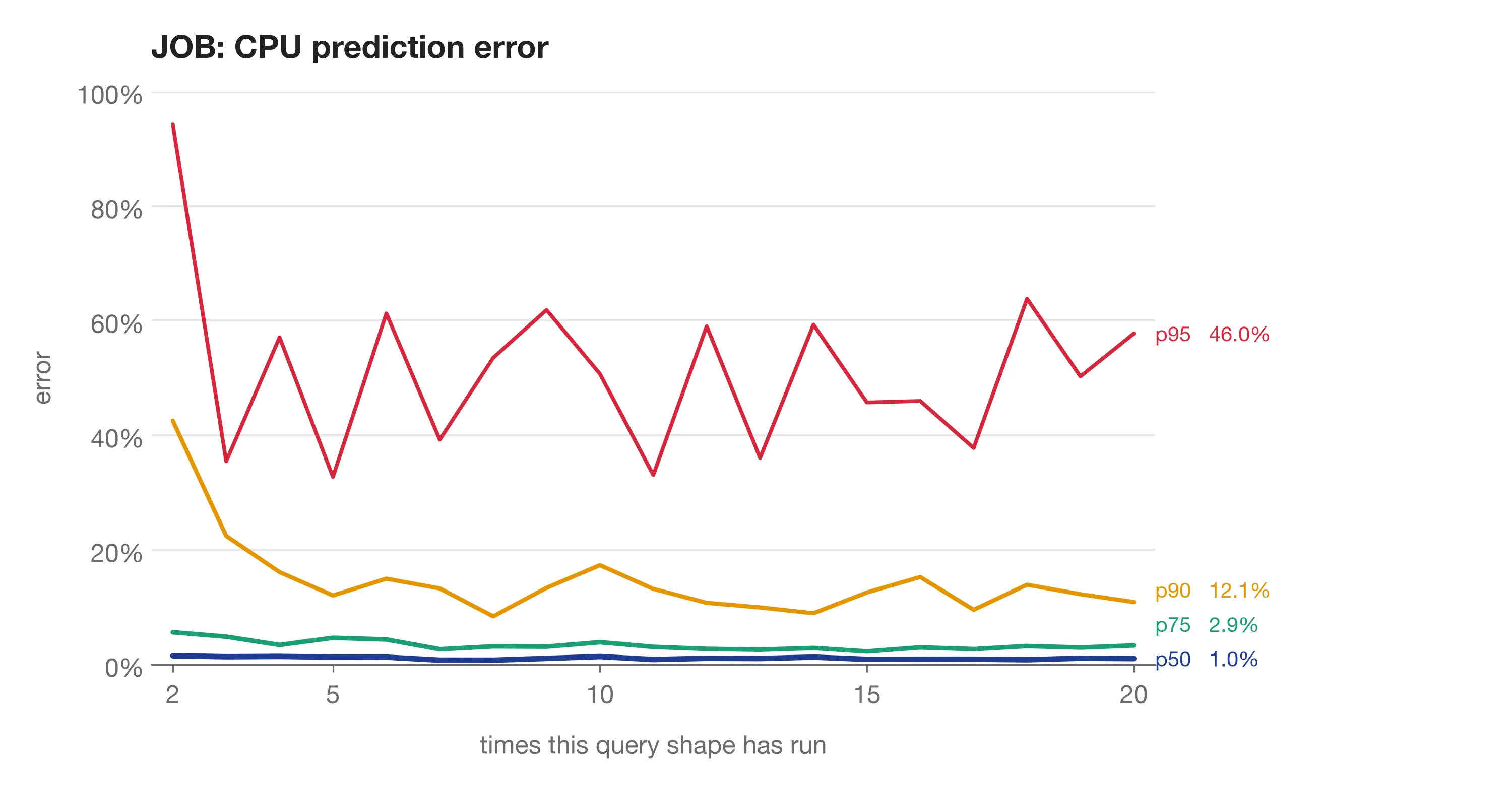
JOB’s median is just as good. Half of all predictions are within 1.0% over runs 11–20, and 75% within 2.9%. But the outliers are worse. 10% of predictions are off by more than 12%, and 5% by more than 46%. These are the extreme outliers which we expect from a benchmark like JOB.
We are predicting CPU so we don’t overload the server, so it makes sense to weight the error by CPU seconds. Mispredicting an expensive 70s query is worse than mispredicting a small 50 ms query. The next two charts show the error, but weighted by CPU resource cost. The percentile p90 = 3.3% means 90% of all CPU spent was predicted within 3.3% of error.
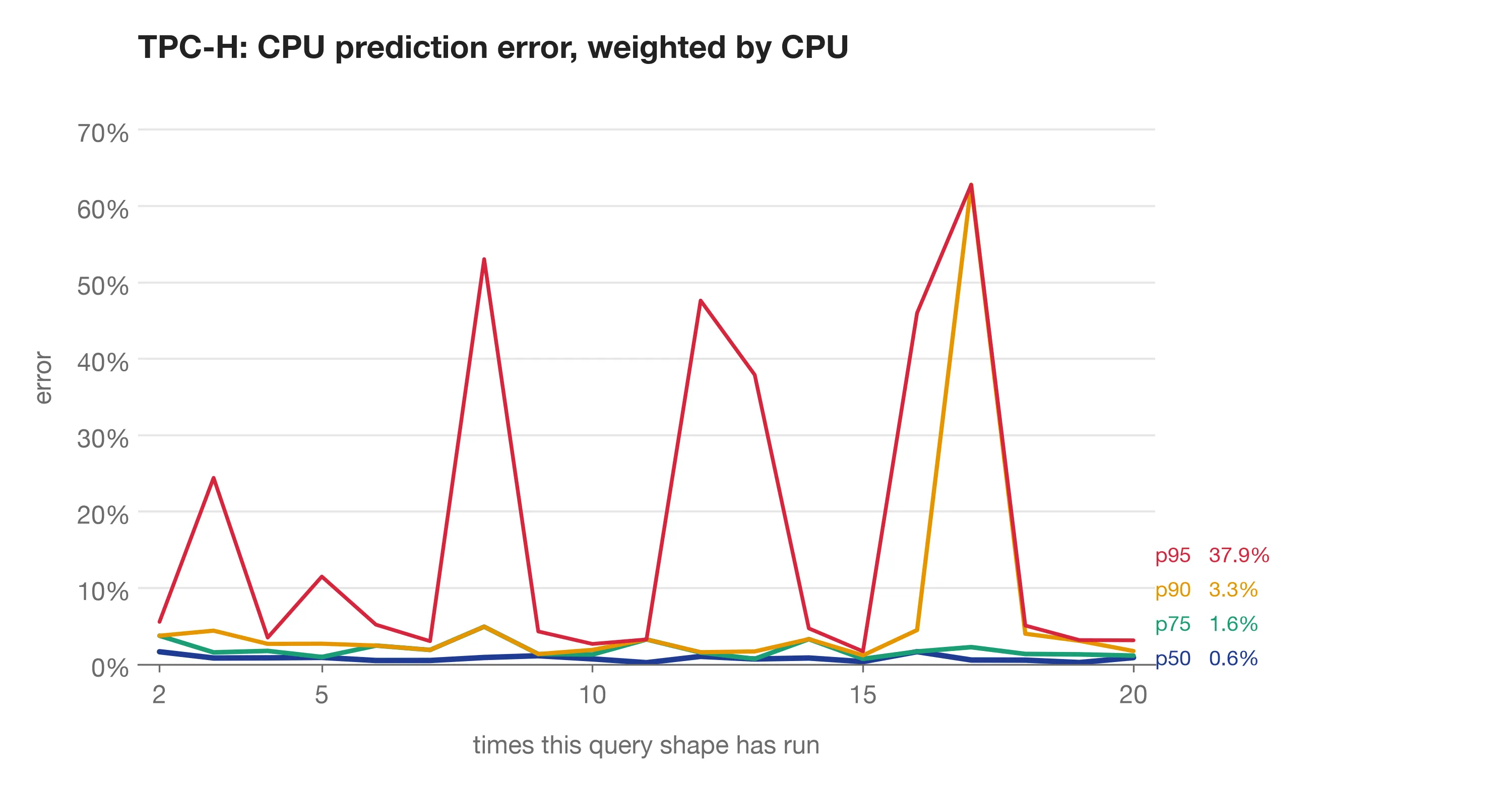
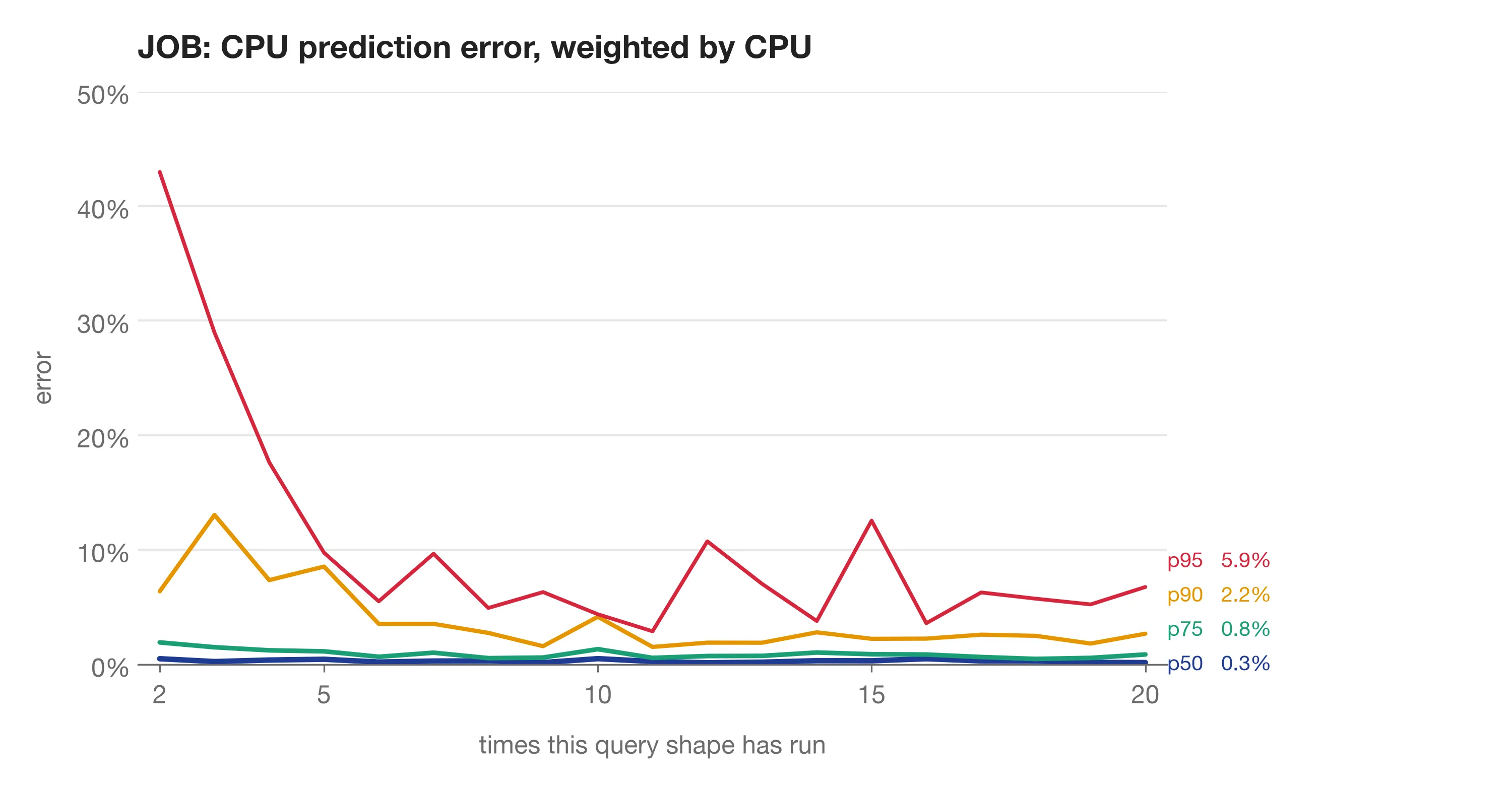
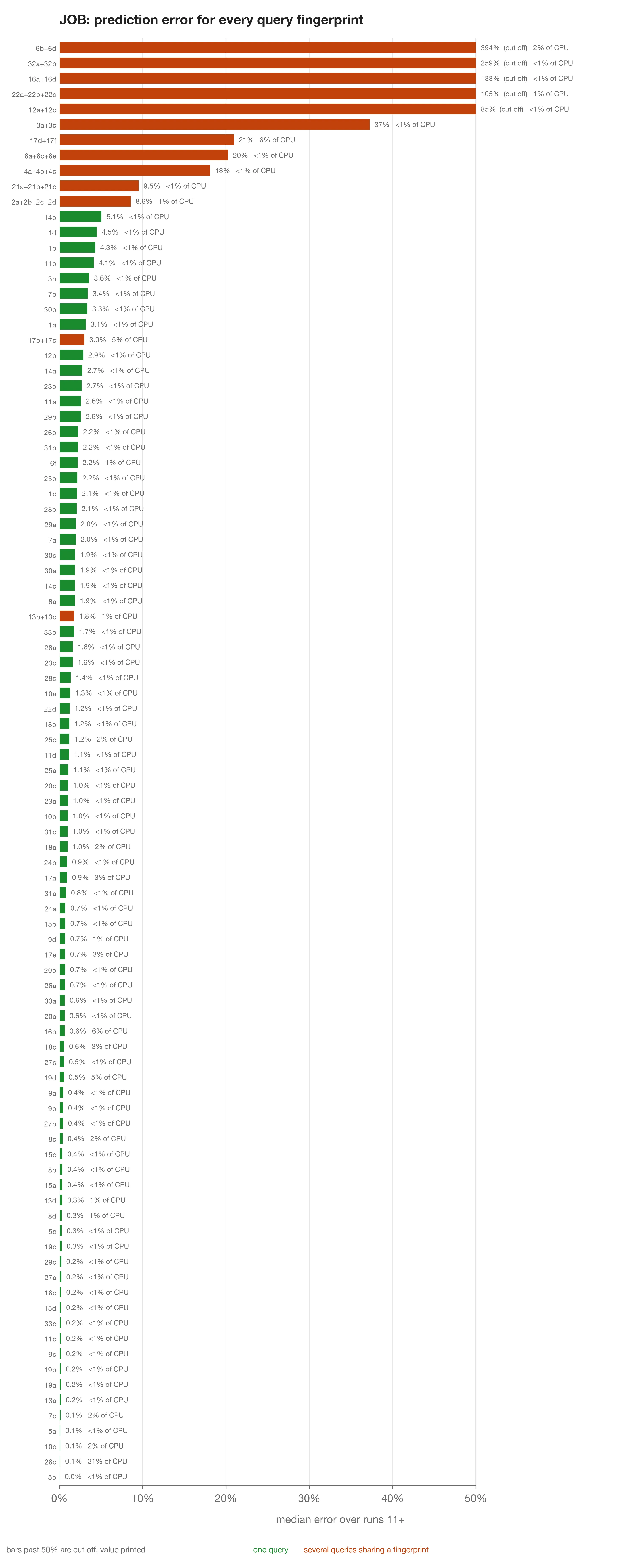
Weighted by CPU, the errors drop. For JOB, 90% of the CPU was predicted within 2.2% and 95% within 5.9%, against 12% and 46% when every prediction counts the same. JOB’s big misses are on small queries. Its expensive queries are predicted well, which is more important.
TPC-H’s p95 goes the other way, from 8.8% to 37.9%. Because TPC-H has only 22 queries, the p95 percentile becomes a single query, Q3. Q3 joins orders to their line items, and Postgres can do that in two ways:
- a hash join that scans all 6 million items once (about 0.7 s of CPU),
- a nested loop that looks up each order’s items through an index (2–3.5 s).
The planner rates the two plans roughly the same, but one uses 3–5 times more CPU than the other, and a single per query can’t represent both. The spikes in error line up with when Postgres’s query planner ran the query with a different plan than the previous run.
A query using 4 times its usual CPU can be problematic, especially during an incident. Postgres 18 added a slot for a plan identifier next to the query identifier, but leaves computing it to extensions. We can use this to make pg_admission aware of these two different plans. Keying on the query and its plan should separate Q3’s two plans. I will test this in the next post.
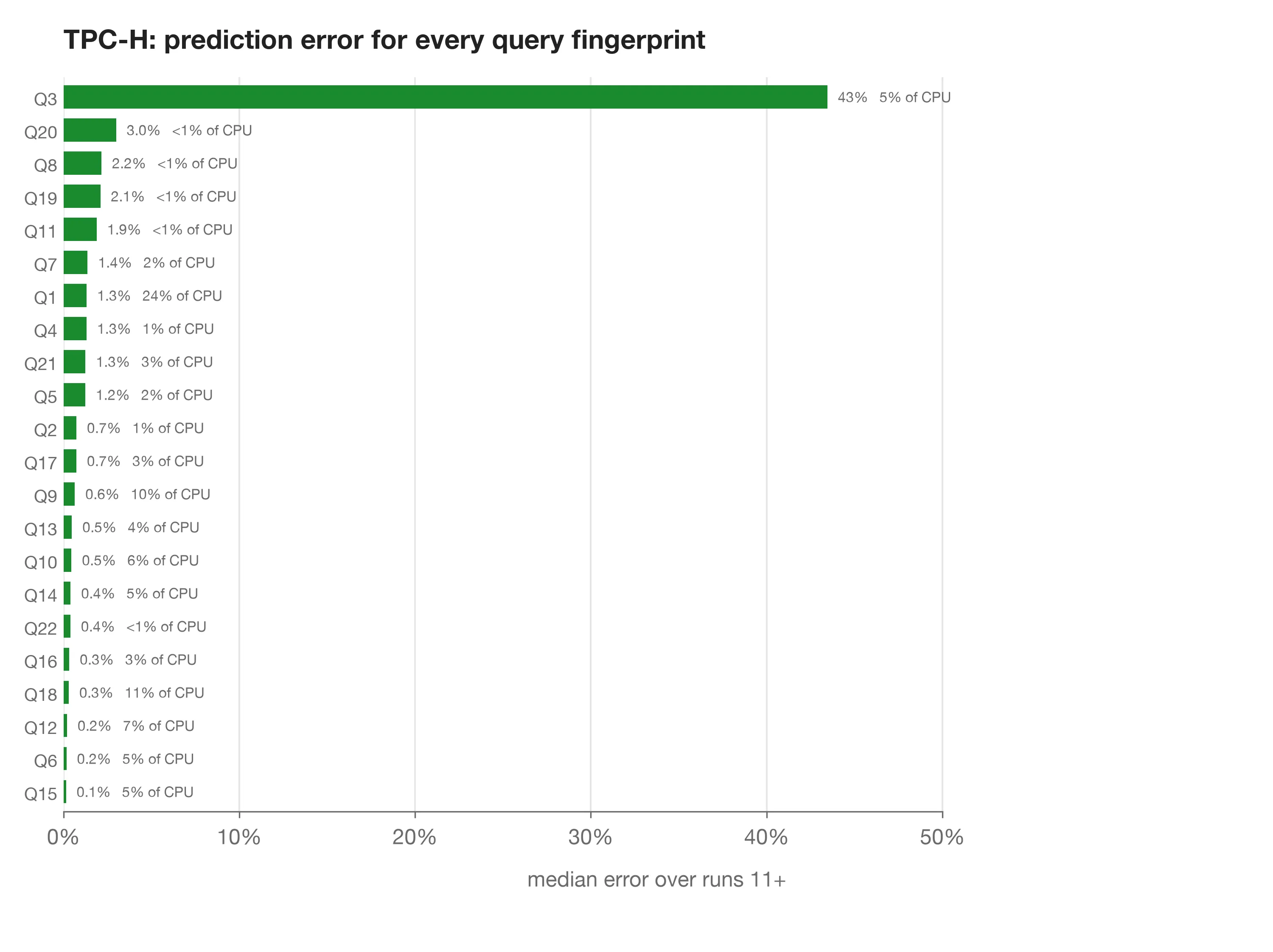
Here’s every TPC-H query, with its median error over runs 11+ and its share of total CPU resources. Every query except Q3 is within 3%, including the heaviest ones, like Q1 (24% of CPU) at 1.3% and Q18 (11%) at 0.3%.
Code
I ran these benchmarks on pg_admission, my own take on PlanetScale Traffic Control. This is a Postgres extension written in Rust. I want to finish it properly before release, so I’m not sharing the code with this post. That means you can’t reproduce these numbers yourself yet unfortunately.
The extension, the benchmark scripts and the raw data will be published together with the next post. I will update this section.
Conclusion
Overall, I am positively surprised with these results! I expected the same query to vary much more in CPU usage from run to run, which would make it hard to predict before it runs. Instead, after a single run, the median error is roughly 1.5%, and weighted by CPU the error is usually under 1%, and 90% of the CPU is predicted within about 3%.
Despite the good results, the benchmarks exposed three weak spots:
- The first run of a query: The first time a query is seen, the model takes the median from all other queries, which is off by 40–100%. However, first runs are 2–5% of the CPU in the benchmarks, and far less in production, where the same queries repeat millions of times. Keeping the learned values across restarts would remove most cold starts in practice.
- Plan switches: When the planner switches plans, like TPC-H Q3, one can’t fit both. Learning a separate per plan should fix this; I haven’t tested it yet.
- Queries with constants: Queries that differ only in a constant, like JOB 32a and 32b, share one even when their CPU differs by an order of magnitude (see the JOB chart in the appendix). The planner gives both the same cost, and almost certainly the same plan, because it can’t tell how many rows each constant will match. I am not yet sure how to solve this.
Next, I’ll measure the overhead of predicting and charging every query. And I’ll try the per-plan on Q3.
Appendix